Create Support Ticket
Create support tickets programmatically for server-side integrations. This API endpoint allows your backend to submit support requests on behalf of users, automatically handling user creation and management.
Server-Side Only: This endpoint is designed for server-side use with API keys. For client-side integrations, use the built-in support form in the Customer Portal.
Overview
The Create Support Ticket API allows you to:
- Submit tickets programmatically - Create support tickets from your server
- Automatic user management - Users are created automatically if they don’t exist
- No prior authentication required - Users don’t need to be logged in beforehand
- Rate limiting - Built-in protection against abuse (max 2 tickets per user per day)
- Custom metadata support - Attach user metadata for context
API Reference
Endpoint
POST https://appbox.space/api/v1/paywall/{paywallId}/create-ticketAuthentication
Include your API key in the request header:
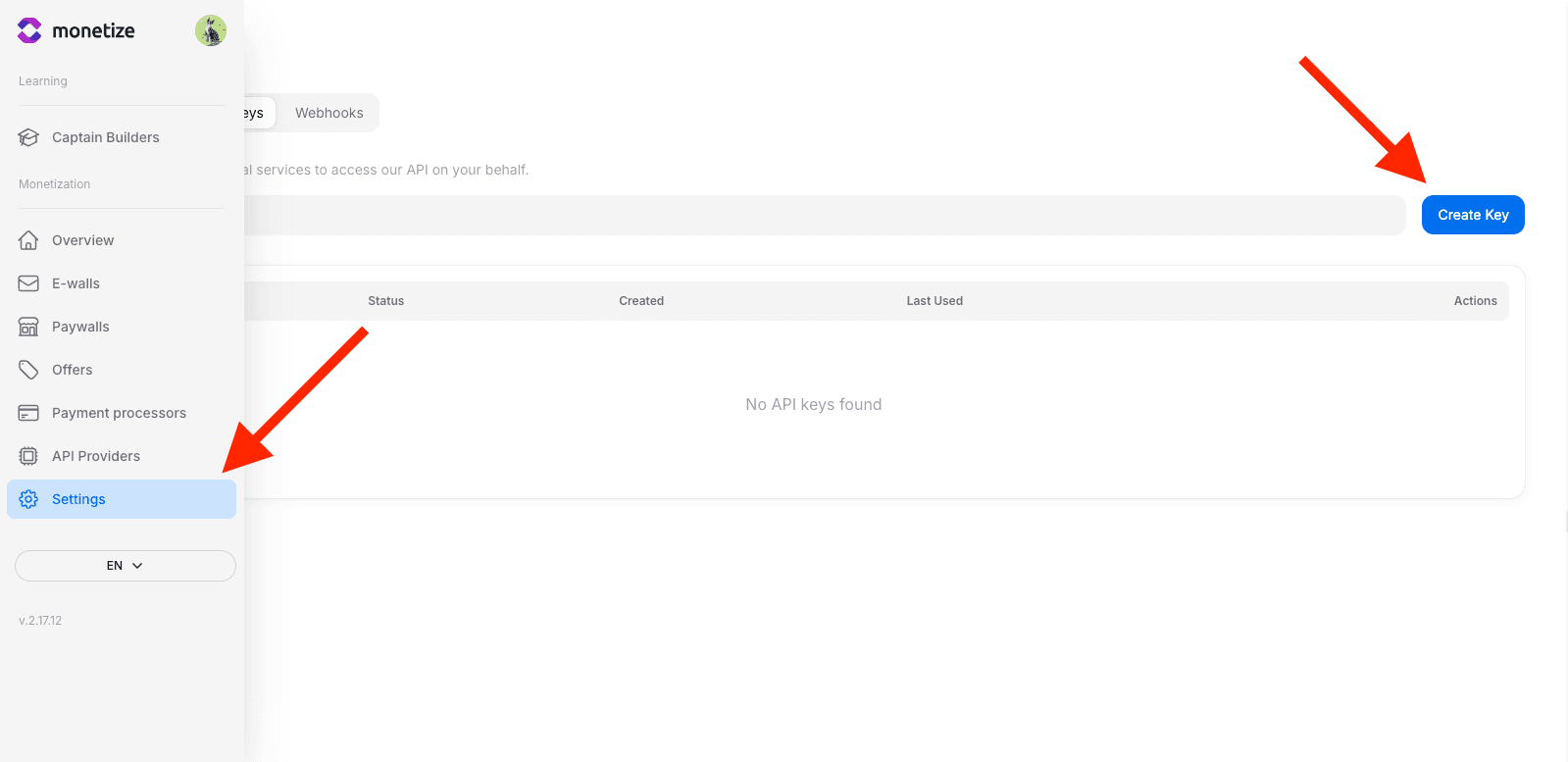
x-api-key: your-secret-api-keyStep 1: Get Your API Key
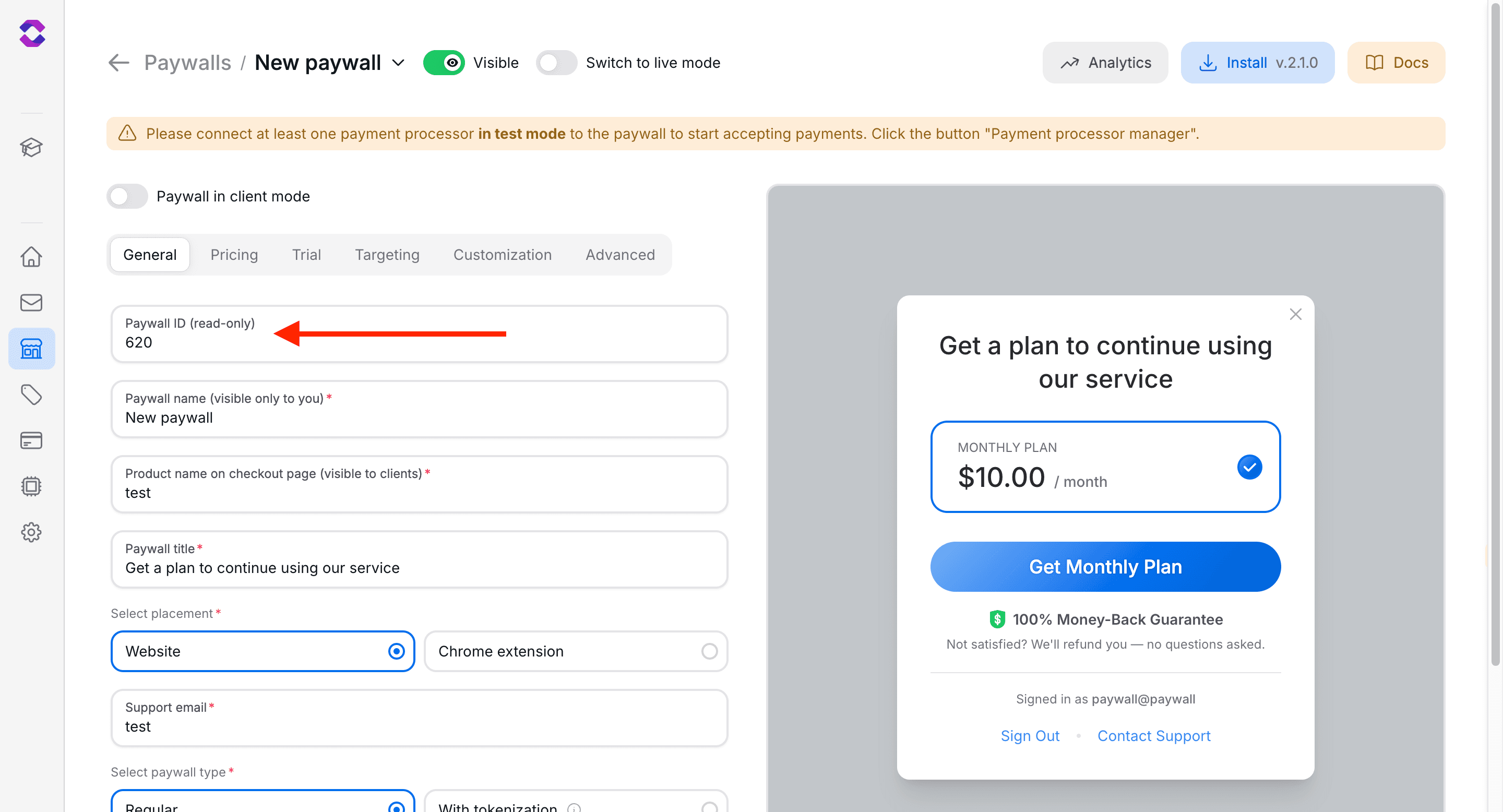
Step 2: Find Your Paywall ID
Get your paywall ID from the paywall settings page URL:
Step 3: Make API Request
Send a POST request with the user’s email, subject, message, and optional metadata:
Request Parameters
URL Parameters
| Parameter | Type | Required | Description |
|---|---|---|---|
| paywallId | string | Yes | Your paywall identifier |
Request Body
| Field | Type | Required | Description |
|---|---|---|---|
| string | Yes | User’s email address | |
| subject | string | Yes | Ticket subject (3-200 characters) |
| message | string | Yes | Ticket message content (1-5000 characters) |
| userMeta | object | No | Custom metadata linked to user |
Example Request Body
{
  "email": "user@example.com",
  "subject": "Cannot access premium features",
  "message": "I purchased a subscription yesterday but still can't access premium features. My order ID is #12345.",
  "userMeta": {
    "my-user-uuid": "pojfoih27938y50ujtb4ip1n2b",
    "plan": "premium"
  }
}
Implementation Examples
JavaScript/Node.js
const paywallId = '123';
const apiKey = 'your-secret-api-key';

const response = await fetch(`https://appbox.space/api/v1/paywall/${paywallId}/create-ticket`, {
  method: 'POST',
  headers: {
    'Content-Type': 'application/json',
    'x-api-key': apiKey
  },
  body: JSON.stringify({
    email: 'user@example.com',
    subject: 'Cannot access premium features',
    message: 'I purchased a subscription but still cannot access premium features.',
    userMeta: {
      "my-user-uuid": "pojfoih27938y50ujtb4ip1n2b"
    }
  })
});

const data = await response.json();

if (response.ok) {
  console.log('Ticket created:', data.ticket);
  // { id: 42, status: 'open' }
} else {
  console.error('Error:', data);
}Response Format
Success Response
{
  "ticket": {
    "id": 42,
    "status": "open"
  }
}
Error Responses
| Status Code | Error Type | Description |
|---|---|---|
| 400 | Bad Request | Missing or invalid parameters (email, subject, message) |
| 401 | Unauthorized | Invalid or missing API key |
| 403 | Forbidden | API key owner does not match paywall owner |
| 429 | Too Many Requests | Rate limit exceeded (max 2 tickets per user per day) |
| 500 | Internal Server Error | Server-side error occurred |
Use Cases
In-App Support Form
Build a custom support form in your application and submit tickets from your server:
// Express.js example
app.post('/support', async (req, res) => {
  const { subject, message } = req.body;

  const response = await fetch(
    `https://appbox.space/api/v1/paywall/${process.env.PAYWALL_ID}/create-ticket`,
    {
      method: 'POST',
      headers: {
        'Content-Type': 'application/json',
        'x-api-key': process.env.API_KEY
      },
      body: JSON.stringify({
        email: req.user.email,
        subject,
        message,
        userMeta: { user_id: req.user.id }
      })
    }
  );

  const data = await response.json();
  res.json({ ticketId: data.ticket.id });
});
Security Guidelines
- Store API keys securely - Never expose API keys in client-side code
- Validate user input - Sanitize subject and message before sending
- Use HTTPS - Always use encrypted connections
- Implement your own rate limiting - Add additional rate limiting on your server if needed